

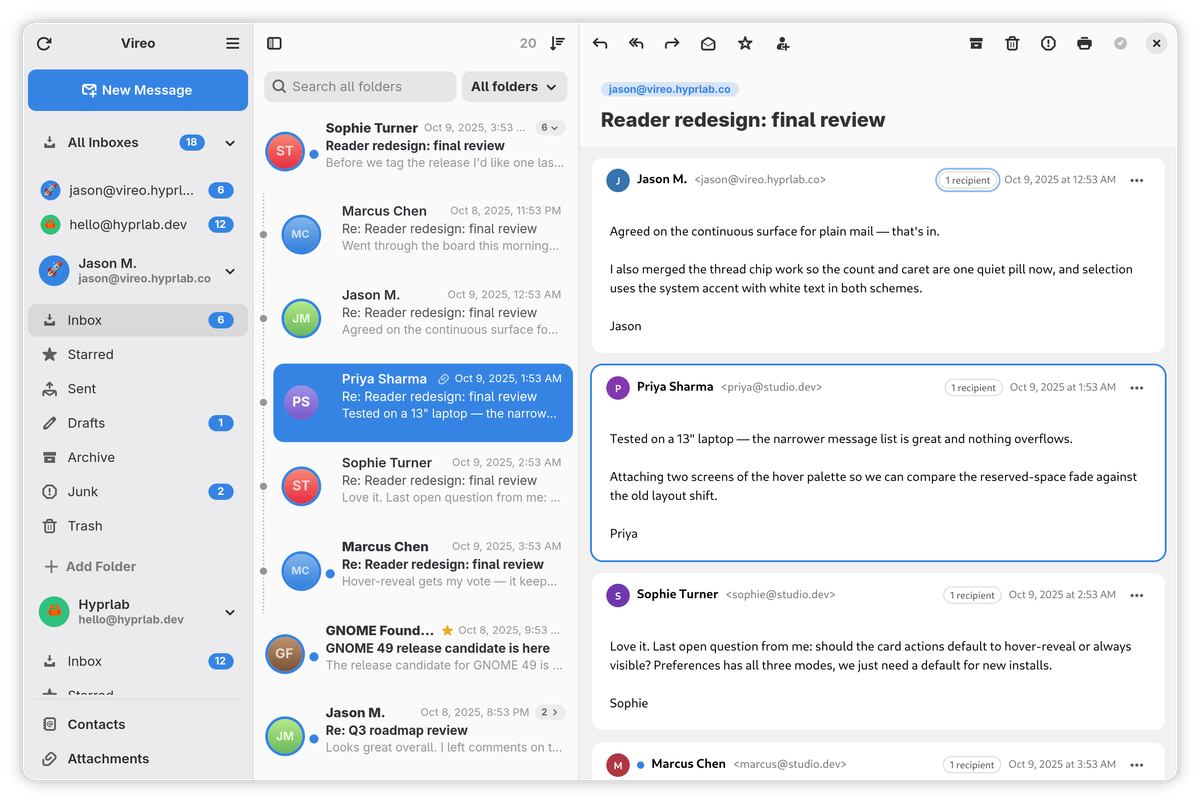
Vireo — formerly known as Veem — is a clean, fast, GNOME-native email client with a calm three-pane layout, a unified inbox, and first-class OAuth support. It's built in Rust with GTK 4 and libadwaita, so it looks and feels like a first-party GNOME app — fast to open, effortless to read, and private by default. Your mail and credentials stay on your machine: no accounts, no telemetry, no cloud middleman.
Features
- Multiple accounts over IMAP and POP3, each on its own background worker, with a unified All Inboxes view
- OAuth 2.0 sign-in through GNOME Online Accounts for Google and Microsoft, plus XOAUTH2 for custom providers; Microsoft 365 accounts imported from GNOME talk to the Graph API directly, so they work where plain IMAP sign-in can't
- Whole-mailbox sync & search — no message-count cap; a fast first page loads instantly, the rest indexes in the background with infinite scroll
- Two-way sync — deletions and moves from your phone or another client sync back automatically (IMAP IDLE + reconciliation)
- A real folder tree — nested IMAP folders as a collapsible hierarchy, rename from the right-click menu, and drag-and-drop to re-nest folders; per-account Special Folders mapping pins Sent, Trash, Junk, Drafts and Archive to the right place when a provider's layout isn't detected
- Conversation threading — threads open on their first unread message, animate open in the list, and can be read newest-first; collapsed rows show the newest reply
- Compose where you read — new messages, replies and forwards slide down over the reading pane as a full-height editor, with a pop-out button when you'd rather have a separate window; HTML signatures, editable drafts, and send-as aliases that can carry their own SMTP server
- Undo, without limit —
Ctrl+Zreverses any move, delete, bulk action, drag-and-drop or spam mark, even after the server has renumbered the message - Outbox — a send that fails is kept and retried when the connection returns, not lost; queued messages can be edited, sent by hand or discarded
- Contacts, in the app — search, browse and edit everyone from GNOME Contacts with a full card per person, and compose straight from it; changes sync back through Evolution Data Server, so CardDAV accounts pick them up
- Attachments done properly — a gallery with grid or sortable table view, type filters and resizable thumbnails, PDFs shown as their actual first page, and Save All
- Sender authentication — the DKIM/SPF/DMARC verdict appears as a seal beside the sender's name, and hovering a link shows where it really goes, so a mismatch between link text and destination is called out
- Printing — print a message with its sender, recipients and date, with an in-app preview that also saves straight to PDF
- Single-key shortcuts — Gmail-style
j/k,r,a,dand friends, without a modifier (off by default; see below) - Message previews — the first one to three lines of each message under its subject in the list, or off
- Runs in the background (optional) — closing the window keeps mail arriving; Vireo appears under Background Apps in the GNOME system menu, and can start at login without opening a window
- Privacy-first reading — remote content blocked by default, per-sender allow/block lists, and a per-message light/dark content theme that re-tints message colors so dark mode is always readable
- Native GNOME feel — adaptive three-pane layout, a sidebar that floats over your mail in narrow windows, per-account accent colors and emoji avatars, an Appearance setting to follow the system or force light/dark, and optional GNOME Contacts integration
Privacy & security
- No telemetry, no analytics — nothing phones home
- Remote content blocked by default to defeat tracking pixels, with per-sender allow/block lists
- Passwords and OAuth tokens live in the system keyring (secret-service), never in plain files
- Anti-phishing built in — sender authentication results are shown up front, and links that claim one destination while pointing at another are flagged
- Notifications can omit the sender and subject, since GNOME shows them on the lock screen
Tech stack
Rust · GTK 4 · libadwaita · WebKitGTK 6 · Poppler (for PDF thumbnails). Credentials are stored in the system keyring.
Install
Flatpak (recommended)
Works on any distribution, on both x86_64 and aarch64 (ARM64) — the repo picks the right architecture on its own:
flatpak install --user --from https://vireo.hyprlab.co/flatpak/co.hyprlab.Vireo.flatpakrefPrefer a direct download? Each release carries Vireo-x86_64.flatpak and Vireo-aarch64.flatpak; grab the one matching uname -m and run flatpak install --user ./Vireo-*.flatpak — the bundle carries the repo address and signing key, so it still receives updates from the official repo.
Fedora
Download the .rpm from the latest release:
sudo dnf install ./vireo-*.x86_64.rpmThe RPM targets current Fedora releases (44+) on x86_64 only — on ARM, or on anything older, use the Flatpak or build from source.
Community packages
An ebuild for Gentoo lives in bennypowers' overlay, and a Nix flake in tbaumann's fork:
# Gentoo
eselect repository enable bennypowers
emaint sync -r bennypowers
emerge -av mail-client/vireo

# Nix
nix run github:tbaumann/vireo
Arch, Debian/Ubuntu and Snap packages were discontinued after 1.7.0 — use the Flatpak, which works on every distribution and updates automatically.
Build from source
Install the GTK 4, libadwaita, WebKitGTK and Poppler development libraries for your distribution first:
# Fedora
sudo dnf install gtk4-devel libadwaita-devel webkitgtk6.0-devel poppler-glib-devel

# Debian / Ubuntu
sudo apt install libgtk-4-dev libadwaita-1-dev libwebkitgtk-6.0-dev libpoppler-glib-dev
Then build and install:
git clone https://github.com/hyprlab/vireo.git
cd vireo
cargo build --release
./install.sh
The install script places the binary, icon and .desktop file under ~/.local. A Secret Service provider (gnome-keyring, preinstalled on GNOME) is needed at runtime for password storage.
Accounts & OAuth
Accounts are added from Settings → Accounts, which now shares one window with the rest of Settings behind a view switcher. Plain IMAP/SMTP needs only your server details and an app password.
Google and Microsoft both sign in through GNOME Online Accounts — add the account in GNOME Settings → Online Accounts, then import it in Vireo. Official builds don't bundle a Google OAuth client (Google's secret can't live in a public repo), so this is the standard path. To use your own OAuth client, put it in ~/.config/vireo/oauth.toml:
[google]
client_id = "your-client-id.apps.googleusercontent.com"
client_secret = "your-client-secret"

[microsoft]
client_id = "your-azure-application-client-id"  # public client, no secret
Proton Mail works through Proton Bridge running locally, as do other local bridges such as hydroxide and DavMail.
Keyboard
Vireo can be driven without holding a modifier, in the style of Gmail and Geary. The scheme is off by default — a stray keystroke shouldn't archive mail — so switch it on in Settings → Message List → Single-key shortcuts. Press Ctrl+? at any time for the full list in the app.
| Key | Action |
|---|---|
j / k | Next / previous message |
l / h | Open the message / back to the list |
w / b | Next / previous message in the conversation |
r / R / f | Reply / reply to all / forward |
a / d / ! | Archive / delete / mark as spam |
s / m | Star / mark read or unread |
c / / | Compose / search |
Ctrl+Z | Undo the last move or delete |
Formerly Veem
Vireo is the app previously published as Veem — renamed at v1.6.0 because the old name was too easily confused with similarly named products. Same app, same code. Native installs migrate your data automatically, and Flatpak users who install Vireo fresh from vireo.hyprlab.co have their accounts, settings and cached mail picked up on first run; the old Veem app can then be removed.
AI notice
Vireo is built by a human maintainer working with generative AI as a development tool:
- Code — the large majority of the Rust code in the repository was written with Anthropic's Claude (via Claude Code), working from the maintainer's direction. The maintainer decides what gets built, reviews the results, tests every release, and signs off on everything that ships.
- Text — documentation, release notes, and website copy are largely AI-drafted and human-edited.
- Artwork — the app icon and other visual assets are human-made, without generative AI.
- The app itself contains no AI. Vireo has no AI features, makes no requests to AI services, and never sends your mail or any other data to one — AI was used to build the app, not to run it.
Bug reports and pull requests are welcome from humans and their AI tools alike; everything merged gets the same human review. Contributions that have shipped are credited in the app's About window.
License
Free and open source under the GNU AGPL-3.0-or-later. Website: vireo.hyprlab.co · Source and releases on GitHub.