


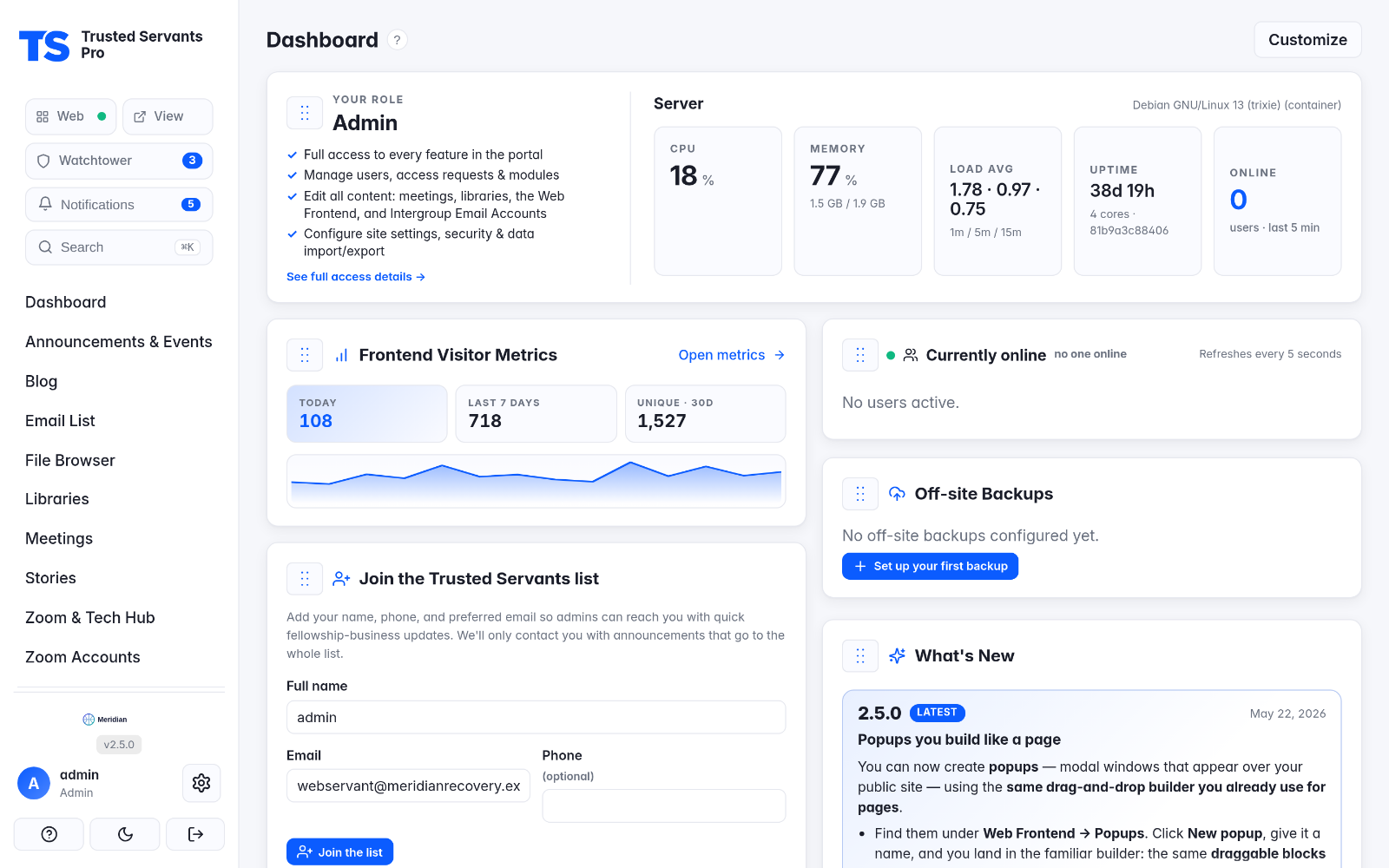
Trusted Servants Pro is a self-hosted web portal that helps addiction-recovery fellowship groups run the practical side of service work: managing meetings, sharing readings and files, coordinating Zoom host accounts, and handling member access requests — all from a single web UI, with no command line required. It ships as a single Docker container with persistent data volumes.
Features
- Meetings — create, edit, archive and restore; in-person / online / hybrid; unlimited weekly schedules, per-meeting logos and alert banners, click-to-copy Zoom credentials
- Libraries — grouped reading collections with drag-and-drop ordering, inline editing, thumbnails and external-link entries
- File browser — a central media library with search, rename, and human-readable public share URLs at
/pub/<filename> - Access requests — a public form on the login screen, emailed to admins, with a triage dashboard
- Zoom account management — Fernet-encrypted credentials, a weekly assignment calendar with conflict detection, and separate OTP email logins
- Themes & branding — six palettes, an animated login screen with nine selectable effects, and configurable sidebar branding
- Dashboard, settings & email — configurable widgets, global SMTP with encrypted passwords and a one-click test send
- Data export/import and Frontend Staging Sync — build on a staging instance and push the public site to live over the network, with automatic rollback snapshots
Requirements
- Docker Engine with the Compose plugin (Ubuntu 24.04 LTS for the automated installer)
- A port for the portal (default
8090) reachable, ideally behind TLS
Install
One-command install (Ubuntu 24.04)
Installs Docker, opens the firewall, provisions a TLS cert (Let's Encrypt or self-signed), generates a secret key, and starts the portal — typically in 2–5 minutes:
curl -fsSL https://raw.githubusercontent.com/hyprlab/trusted-servants-pro/main/install.sh | sudo bash
Run it non-interactively by passing env vars:
sudo TSP_DOMAIN=portal.example.org \
     TSP_ACME_EMAIL=<your-email> \
     TSP_ADMIN_PASSWORD='a-strong-password' \
     bash install.sh
Docker Compose (manual)
services:
  tsp:
    image: hyprlab/tspro:latest
    container_name: tspro
    ports:
      - "8090:8000"
    volumes:
      - ./data:/data
      # Read-only host mounts powering the system-info panel.
      - /proc:/host/proc:ro
      - /etc/os-release:/host/etc/os-release:ro
      - /etc/hostname:/host/etc/hostname:ro
    environment:
      - TSP_SECRET_KEY=${TSP_SECRET_KEY:?TSP_SECRET_KEY must be set in .env}
      # First-boot admin seed. Without TSP_ADMIN_PASSWORD the app refuses to
      # seed (and won't boot on an empty DB) unless TSP_DEBUG=1, which falls
      # back to admin/admin for local dev only.
      - TSP_ADMIN_USERNAME=${TSP_ADMIN_USERNAME:-admin}
      - TSP_ADMIN_PASSWORD=${TSP_ADMIN_PASSWORD:-}
      # Optional — omitted here so the app applies its own default;
      # set TSP_ADMIN_EMAIL in .env to override it.
      - TSP_ADMIN_EMAIL
      # Local dev only — serves over HTTP without the Secure cookie flag.
      # Leave at 0 in production.
      - TSP_DEBUG=${TSP_DEBUG:-0}
      - TSP_HOST_PROC=/host/proc
      - TSP_HOST_ETC=/host/etc
    restart: unless-stopped
    # Cap container logs so an unattended box can't fill its disk over time
    # (the default json-file driver is unbounded).
    logging:
      driver: json-file
      options:
        max-size: "10m"
        max-file: "3"
Generate a secret key into .env, then start and open http://localhost:8090 (default admin / admin — change it immediately):
openssl rand -base64 48 | tr -d '\n/+=' | cut -c1-64   # -> TSP_SECRET_KEY in .env
docker compose up -d
Configuration
| Variable | Default | Purpose |
|---|---|---|
TSP_SECRET_KEY |
dev-secret-change-me |
Flask session signing key (set in production) |
TSP_ADMIN_USERNAME / TSP_ADMIN_PASSWORD / TSP_ADMIN_EMAIL |
admin / admin / … |
Seeded on first boot only |
TSP_DATA_DIR |
/data |
In-container data directory |
TSP_FERNET_KEY |
auto | Encryption key for Zoom/SMTP secrets (stored at data/zoom.key if unset) |
Zoom, OTP-email and SMTP passwords are encrypted at rest with Fernet. Uploads are capped at 256 MB.
Example .env
Copy this to .env next to your docker-compose.yml and adjust:
# Copy to .env and fill in. TSP_SECRET_KEY signs session cookies AND
# seeds the Fernet key for encrypted credentials — rotating it
# invalidates stored Zoom/OTP passwords.
TSP_SECRET_KEY=change-me-to-a-long-random-value

# First-boot admin seed (ignored once any user exists). Required on an
# empty database unless TSP_DEBUG=1.
#TSP_ADMIN_USERNAME=admin
#TSP_ADMIN_PASSWORD=
#TSP_ADMIN_EMAIL=<your-email>

# Local development ONLY: serve over plain HTTP (no Secure cookie flag),
# enable Flask debug, and fall back to seeding admin/admin when
# TSP_ADMIN_PASSWORD is unset. Never enable in production.
#TSP_DEBUG=1
Updating
Manual:
cd /opt/tspro
docker compose pull && docker compose up -d
Or let the bundled Watchtower service auto-update the container every 24 hours.
AI notice
Trusted Servants Pro is built by a human maintainer working with generative AI as a development tool:
- Code — the large majority of the code in the repository was written with Anthropic's Claude (via Claude Code), working from the maintainer's direction. The maintainer decides what gets built, reviews the results, tests every release, and signs off on everything that ships.
- Text — documentation, release notes, and in-app copy are largely AI-drafted and human-edited.
- The app itself contains no AI. Trusted Servants Pro has no AI features and makes no requests to AI services — AI was used to build it, not to run it.
Bug reports and pull requests are welcome from humans and their AI tools alike; everything merged gets the same human review.
Tech stack & license
Flask · SQLAlchemy · SQLite, with Fernet-encrypted secrets and Caddy for TLS, in a single Docker container. Free and open source under the GNU AGPL-3.0. Website: gettspro.com · Source and releases on GitHub.

