

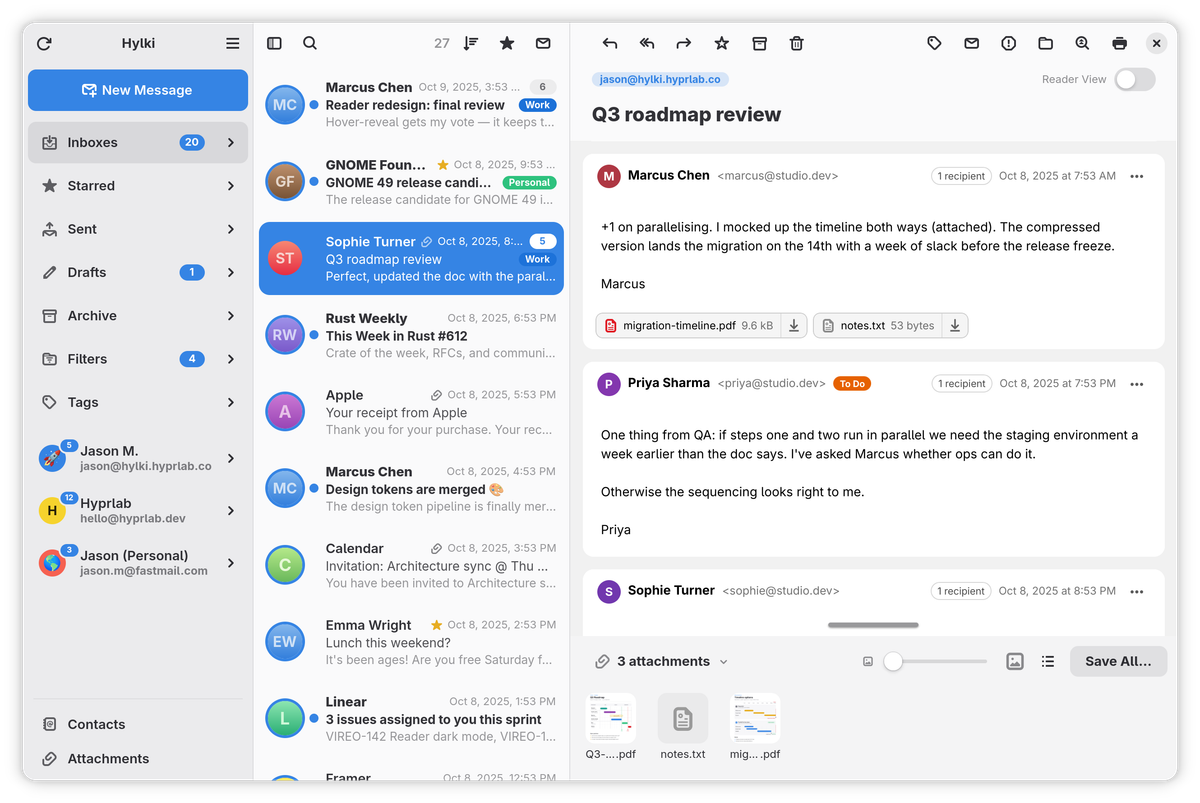
Hylki is a fast, GNOME-native email client with a three-pane layout, a unified inbox, and first-class OAuth support. It's built in Rust with GTK 4 and libadwaita, so it looks and feels like a first-party GNOME app. Fast to open, effortless to read, and private by default. Your mail and credentials stay on your machine: no accounts, no telemetry, no cloud middleman.
Features
- Multiple accounts over IMAP and POP3, each on its own background worker, with a unified Inboxes view
- OAuth 2.0 sign-in — Microsoft works out of the box, Google signs in through GNOME Online Accounts, and custom providers use XOAUTH2; Microsoft 365 accounts imported from GNOME talk to the Graph API directly, so they work where plain IMAP sign-in can't
- Whole-mailbox sync & search — no message-count cap; a fast first page loads instantly, the rest indexes in the background with infinite scroll
- Two-way sync — deletions, moves and flag changes from your phone or another client sync back automatically (IMAP IDLE + reconciliation)
- Full folder management — create, rename, move and delete folders, drag-and-drop to re-nest them, and assign the special roles (Drafts, Sent, Junk, Trash, Archive) when a provider's layout isn't detected
- Conversation threading — threads open on their first unread message, count the whole conversation across folders rather than just the folder you're in, and can be read newest-first
- Filters and tags — multi-condition rules on sender, recipient, subject, body and Reply-To that tag mail, file it away, or both, and can be run over mail already sitting in a folder; tags are stored as IMAP keywords (or Graph categories), so a tag set here is the tag your other client sees
- Four ways to write — rich text, Markdown, hand-written HTML or plain text, switched per message; nothing goes out as source, and both source formats get a text part made for them
- Compose where you read — new messages, replies and forwards slide over the reading pane as a full-height editor, with a pop-out button when you'd rather have a separate window; HTML signatures, editable drafts, and send-as aliases that can carry their own SMTP server
- Outbox and Send Later — a send that fails is kept and retried when the connection returns, not lost, and any message can be scheduled for tomorrow morning, Monday, or a date and time of your own
- Cloud attachments — put a big file on your own Nextcloud, ownCloud, OpenCloud or Seafile server, or on OneDrive or Dropbox, and send a share link with an optional expiry and download password
- Undo and redo —
Ctrl+Zreverses moves, deletes, bulk actions, drag-and-drop, flags, tags and folder changes, and reaches into the composer as well; the main menu names what it will undo - Reader View — one toggle strips a conversation down to what it says: the sender's layout tables, colours, fonts, hidden preview text and tracking pixels are gone, and what's left is set in one sheet that follows your theme
- Meeting invitations — what the meeting is, when it runs in your own clock and time zone, where it is and who organised it, with Accept, Maybe, Decline and Add to Calendar; your answer goes back as a reply the organiser's calendar understands
- One-click unsubscribe — a banner on list mail that leaves the list for you, by request or by email, without a browser where the list allows it
- OpenPGP — read, sign and encrypt mail and manage keys from Settings, through the GnuPG already on your computer; decrypted text is never cached
- Sender authentication — DKIM, SPF and DMARC checked on arrival and shown as a seal beside the sender's name, with BIMI logos where a domain publishes one, and a warning when a link's text and destination disagree
- Attachments done properly — every attachment in an account or folder in one gallery, with PDF first-page thumbnails, type filters, a deep archive scan and Save All; each message also lists its own files beneath its text
- Printing — a message with its sender, recipients and date, with an in-app preview that also saves straight to PDF
- Contacts, in the app — search, browse and edit everyone from your GNOME address book with a full card per person, and compose straight from it; changes sync back through Evolution Data Server, so CardDAV accounts pick them up
- Appearance themes — five palettes (Rose, Forest, Tidal, Earth and Midnight), each with its own light and dark version, or the stock GNOME colours
- Focus Mode —
Ctrl+Shift+Ffolds the toolbars, sidebar and list down to what you're reading, and puts it all back afterwards - Single-key shortcuts — Gmail-style
j/k,r,a,dand friends, without a modifier (off by default) - Runs in the background (optional) — closing the window keeps mail arriving; Hylki appears under Background Apps in the GNOME system menu, can start at login without opening a window, and offers a tray icon for desktops that have one
- Native GNOME feel — adaptive three-pane layout, a sidebar that floats over your mail in narrow windows, per-account accent colours and emoji, picture or Gravatar avatars, swipe actions, a customizable reader toolbar, and light and dark following the system
- Your language — the desktop's or one you pick, with a 12- or 24-hour clock following the desktop setting
Privacy & security
- No telemetry, no analytics — nothing phones home
- Remote content blocked by default to defeat tracking pixels, with per-sender allow/block lists and a per-message override
- Passwords and OAuth tokens live in the system keyring (secret-service), never in plain files; decrypted OpenPGP mail is never cached
- Anti-phishing built in — sender authentication results are shown up front, and links that claim one destination while pointing at another are flagged
- Notifications can omit the sender and subject, since GNOME shows them on the lock screen
- Everything in one place — settings in
~/.config/hylki/, the mail index and cached messages in~/.cache/hylki/, avatars in~/.local/share/hylki/(all under~/.var/app/co.hyprlab.Hylki/for a Flatpak install); nothing else on the computer is written to
Tech stack
Rust · GTK 4 · libadwaita · WebKitGTK 6 · Poppler (for PDF thumbnails) · GnuPG (for OpenPGP). Credentials are stored in the system keyring.
Install
Flatpak (recommended)
Works on any distribution, on both x86_64 and aarch64 (ARM64) — the repo picks the right architecture on its own and keeps the app updated:
flatpak install --user --from https://hylki.hyprlab.co/flatpak/co.hyprlab.Hylki.flatpakrefPrefer a direct download? Each release carries Hylki-x86_64.flatpak and Hylki-aarch64.flatpak; grab the one matching uname -m and run flatpak install --user ./Hylki-*.flatpak — the bundle carries the repo address and signing key, so it still receives updates from the official repo.
Fedora
Download the .rpm from the latest release:
sudo dnf install ./hylki-*.x86_64.rpmThe RPM targets current Fedora releases (44+) on x86_64 only — on ARM, or on anything older, use the Flatpak or build from source.
Community packages
An ebuild for Gentoo lives in bennypowers' overlay, and a Nix flake in tbaumann's fork:
# Gentoo
eselect repository enable bennypowers
emaint sync -r bennypowers
emerge -av mail-client/hylki

# Nix
nix run github:tbaumann/hylki
Arch, Debian/Ubuntu and Snap packages were discontinued after 1.7.0 — use the Flatpak, which works on every distribution and updates automatically.
Beta channel
Betas install alongside the stable app as a separate application, with their own settings and cache, so you can run both:
flatpak install --user --from https://hylki.hyprlab.co/flatpak/co.hyprlab.Hylki.Beta.flatpakrefBuild from source
Install the GTK 4, libadwaita, WebKitGTK and Poppler development libraries for your distribution first:
# Fedora
sudo dnf install gtk4-devel libadwaita-devel webkitgtk6.0-devel poppler-glib-devel

# Debian / Ubuntu
sudo apt install libgtk-4-dev libadwaita-1-dev libwebkitgtk-6.0-dev libpoppler-glib-dev
Then build and install:
git clone https://github.com/hyprlab/hylki.git
cd hylki
cargo build --release
./install.sh
The install script places the binary, icon and .desktop file under ~/.local, and ./uninstall.sh takes them away again (--purge also clears settings and the mail cache). A Secret Service provider (gnome-keyring, preinstalled on GNOME) is needed at runtime for password storage; a source or RPM install also wants gnupg2 for OpenPGP and nautilus-python for the Send with Hylki entry in GNOME Files.
Formerly Vireo
Hylki is the app previously published as Vireo, and as Veem before that — renamed at v1.35.0, with new artwork to match. Same app, same code. Hylki installs alongside Vireo rather than replacing it, and its first start carries your accounts, settings and cached mail across: nothing in Vireo is changed or removed, and there is nothing to set up again. A notice tells you what came over and how to remove Vireo once you're happy everything is there. If Vireo was your default email app, choose Hylki under Default Apps in GNOME Settings.
AI notice
Hylki is built by a human maintainer working with generative AI as a development tool:
- Code — the large majority of the Rust code in the repository was written with Anthropic's Claude (via Claude Code), working from the maintainer's direction. The maintainer decides what gets built, reviews the results, tests every release, and signs off on everything that ships.
- Text — documentation, release notes, and website copy are largely AI-drafted and human-edited.
- Artwork — the app icon and other visual assets are human-made, without generative AI.
- The app itself contains no AI. Hylki has no AI features, makes no requests to AI services, and never sends your mail or any other data to one — AI was used to build the app, not to run it.
Bug reports and pull requests are welcome from humans and their AI tools alike; everything merged gets the same human review. Contributions that have shipped are credited in the app's About window.
License
Free and open source under the GNU AGPL-3.0-or-later. Website: hylki.app · Source and releases on GitHub.
