

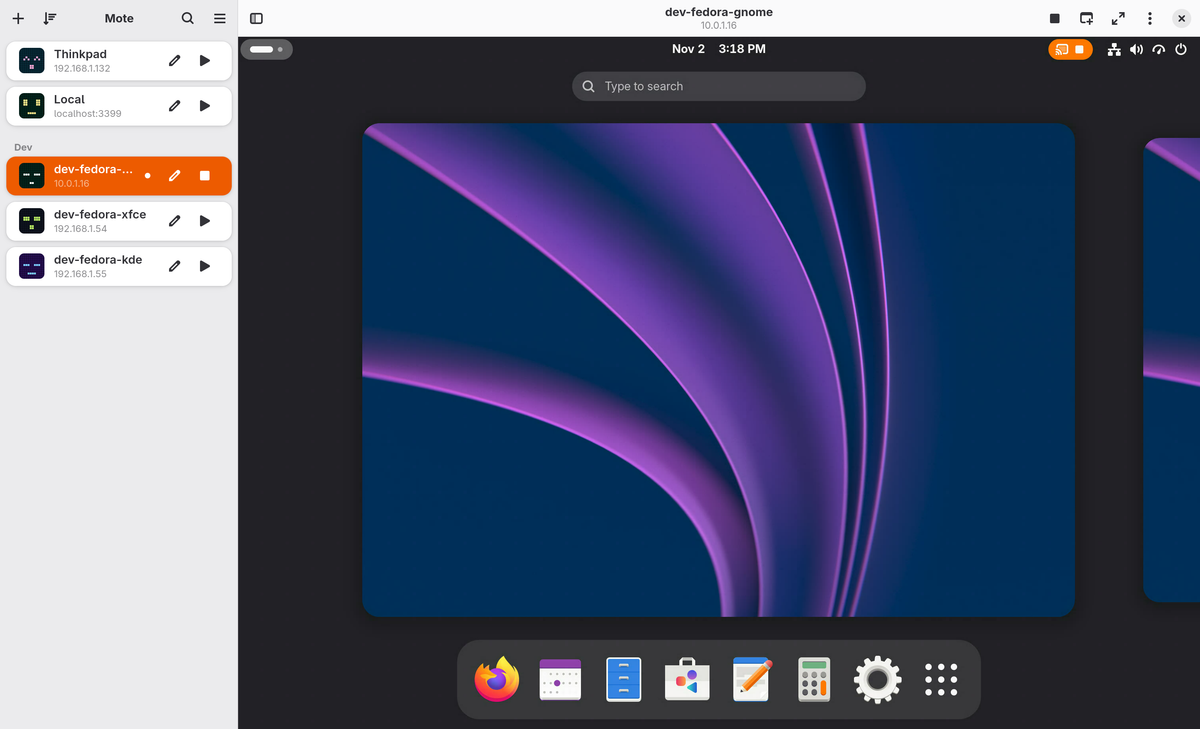
Mote is a native GNOME remote desktop client for connecting to Linux machines that run an RDP server: GNOME Remote Desktop, xrdp or KRdp. It's built in Rust with GTK 4 and libadwaita on top of the IronRDP protocol engine, stays sharp on HiDPI displays, and aims to do everything Remmina's RDP plugin does in a GNOME-native interface. Mote 1.0 is the first stable release.
Features
- Made for Linux — designed and tested for GNOME Remote Desktop (both Desktop Sharing and Remote Login), xrdp and KRdp
- Dynamic resizing — the remote resolution follows the window size, with HiDPI and fractional scaling built in for a sharp picture at any scale
- H.264 video — smooth video through the RDP graphics pipeline, decoded by FFmpeg, the system's OpenH264 or Cisco's OpenH264, with a RemoteFX fallback and a helper to install the right codec
- Full clipboard sharing — copy and paste text, rich text, images and files in both directions
- SSH tunnels and RD Gateway — reach machines behind a firewall over SSH or through an RD Gateway
- Wake-on-LAN and reconnecting — wake a sleeping machine before connecting, and reconnect automatically when the network drops
- Multi-monitor — use every monitor on the remote machine, or just one, in fullscreen
- Sound, microphone and folder sharing — hear the remote desktop, send your microphone to it, and lend it a shared folder
- Keyboard handling — desktop shortcuts are held back while a session has focus; Right Ctrl alone releases the keyboard and shows the header in fullscreen
- Import and organize connections — import .rdp files or an existing Remmina setup, export as .rdp, and sort connections into groups in the sidebar with custom ports and domains
Compatibility
- GNOME Remote Desktop — GNOME 46 or later; Desktop Sharing and Remote Login are both supported, with H.264 when the remote machine has a compatible graphics card
- xrdp — version 0.10 or later, with and without the graphics pipeline; PulseAudio and PipeWire sound modules work, and H.264 arrives from 0.10.2
- KRdp — KDE Plasma 6's own server, which encodes H.264 with FFmpeg
- Windows — Mote has not been tested against a Windows machine yet; if you try it, the maintainer would like to hear how it went
Privacy & security
- No telemetry, no analytics — no tracking and no usage data; the app makes no connection you didn't ask for
- Direct connections — Mote connects straight to your machines with no relay in between
- Passwords in the keyring — credentials are stored in your desktop's Secret Service keyring (GNOME Keyring or KWallet)
- Identities checked — a machine's certificate, an SSH host key or a gateway's certificate is shown before the first connection
Tech stack
Rust · GTK 4 · libadwaita · Relm4 · IronRDP. SSH tunnels use russh, H.264 is decoded with FFmpeg or OpenH264, and the connection avatars are DiceBear Pixelbot robots.
Install
Mote is available for 64-bit Intel/AMD and ARM as a Flatpak, AppImage or native DEB/RPM package from mote.hyprlab.co. You'll need a Secret Service keyring (GNOME Keyring or KWallet); working GPU drivers and a GNOME-style desktop are recommended.
Flatpak
Installing from the flatpakref adds the Mote repository, so updates arrive through your normal software updater. Mote runs on the shared GNOME runtime from Flathub:
flatpak install --from https://mote.hyprlab.co/flatpak/co.hyprlab.Mote.flatpakrefFedora
sudo curl -fsSLo /etc/yum.repos.d/mote.repo https://mote.hyprlab.co/rpm/mote.repo
sudo dnf install mote
Debian and Ubuntu
sudo curl -fsSLo /etc/apt/sources.list.d/mote.sources https://mote.hyprlab.co/deb/mote.sources
sudo apt update && sudo apt install mote
AppImage
Download Mote-x86_64.AppImage or Mote-aarch64.AppImage, make it executable and run it.
Build from source
A development build needs the GTK 4 and libadwaita development libraries (see docs/BUILDING.md for details):
git clone https://github.com/hyprlab/mote.git
cd mote
cargo build
./target/debug/mote
AI notice
Mote is built by a human maintainer who uses generative AI as a development tool. The maintainer decides what gets built, reviews the results, tests every release and signs off on everything that ships. The app itself contains no AI and makes no requests to AI services. The app icon was made by Jason M.
Bug reports and pull requests are welcome whether or not AI tools were involved, and everything merged is reviewed by a person.
License
Free and open source under the GNU AGPL-3.0-or-later. Website: mote.hyprlab.co · Source and releases on GitHub.

