

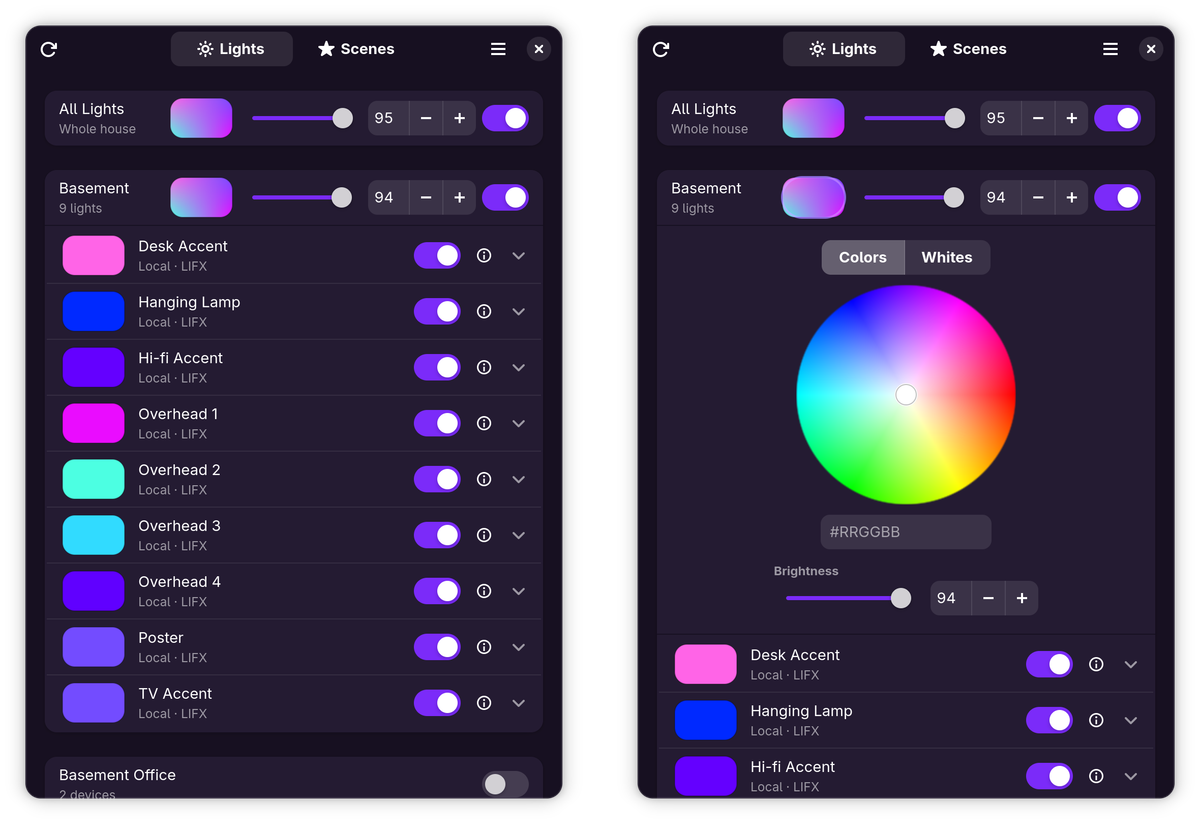
Luxel is a native GNOME app for controlling LIFX smart bulbs — and SmartLife/Tuya smart plugs — from the Linux desktop, with no phone in the loop. It's built in Rust with GTK 4 and libadwaita, finds your devices directly on your own network, and controls them with millisecond latency. Group everything into rooms, save scenes, and dial in the perfect color or warm white from one calm panel.
Features
- Local control, no cloud needed — LIFX bulbs are discovered directly on your Wi-Fi/LAN over the LIFX UDP protocol and controlled instantly; no account, no internet required
- SmartLife/Tuya smart plugs — plugs that speak the Tuya local protocol are controlled over your own network on TCP port 6668, including across subnets and VLANs; protocol versions 3.3, 3.4 and 3.5 are detected automatically. Plugs show a power switch, join rooms and scenes, and count into the room and All Lights switches
- Guided SmartLife setup — a built-in wizard in Settings handles the whole onboarding: creating the free Tuya developer account, linking the SmartLife app, then fetching every device's ID and local key straight from the Tuya Cloud API in-app — no terminal, no Python. It then finds each device on your network by identity and fills in the IP and protocol version automatically, which works even where broadcast-based scanners can't reach. Importing a tinytuya
devices.jsonremains as a fallback, and devices can always be entered by hand - Rooms — devices group into room sections automatically from their LIFX group, or assign any device to a different or brand-new room
- Whole-house control — every room header has its own color button, power switch, and brightness slider, and an "All Lights" row drives the entire house at once; rooms holding only plugs show just a power switch
- Scenes — save the current state of your devices under a name and restore it with one click, choosing exactly which ones each scene includes; scenes are stored locally, and can be exported to a JSON file and imported back to move them between machines
- A real color wheel — a LIFX-style hue & saturation wheel (white at the center, colors toward the rim) plus an RGB hex entry for exact shades
- Warm whites, tuned — a color-temperature slider from candlelight to daylight (1500–9000 K), a typed kelvin entry, and the live LIFX shade name (Incandescent, Daylight…)
- Live state polling — changes made from the LIFX app or a physical switch show up automatically, and devices gray out when they're unreachable
- Isolated IoT networks supported — bulbs on a separate subnet/VLAN can be reached by listing their subnets in Settings; each gets a directed-broadcast probe plus a unicast sweep that routes across VLANs
- Optional LIFX Cloud support — add a personal access token to list and control lights through the cloud when you're away; local control is always preferred when both work
Privacy & security
- No telemetry, no analytics — nothing phones home
- Tight Flatpak sandbox — network access only; no host filesystem access
- Day-to-day control stays local — after the one-time SmartLife setup, controlling your plugs never touches the Tuya cloud again
- The optional LIFX cloud token and the Tuya API credentials are stored in the app's sandboxed config directory
Tech stack
Rust · GTK 4 · libadwaita · lifx-core. Local control speaks the LIFX LAN protocol over UDP and the Tuya LAN protocol over TCP; optional cloud access uses the LIFX HTTP API, plus the Tuya Cloud API during SmartLife setup only.
Install
Flatpak
Luxel ships as a Flatpak from its own repo at luxel.hyprlab.co — one command to install, and updates arrive through your normal software updater:
flatpak install --from https://luxel.hyprlab.co/flatpak/io.github.hyprlab.Luxel.flatpakrefBuild from source
A development build needs the GTK 4 and libadwaita development libraries (gtk4-devel and libadwaita-devel on Fedora, or your distribution's equivalent):
git clone https://github.com/hyprlab/luxel.git
cd luxel
cargo run
To build the Flatpak locally, install the GNOME 50 SDK and the Rust extension, then:
flatpak-builder --user --install --force-clean build \
    build-aux/io.github.hyprlab.Luxel.json
flatpak run io.github.hyprlab.Luxel
Shortcuts
| Action | Shortcut |
|---|---|
| Rescan for lights | Ctrl+R |
| Settings | Ctrl+, |
| Keyboard shortcuts | Ctrl+? |
| Quit | Ctrl+Q |
AI notice
Luxel is built by a human maintainer working with generative AI as a development tool:
- Code — the large majority of the code in the repository was written with Anthropic's Claude (via Claude Code), working from the maintainer's direction. The maintainer decides what gets built, reviews the results, tests every release, and signs off on everything that ships.
- Text — documentation, release notes, and in-app copy are largely AI-drafted and human-edited.
- The app itself contains no AI. Luxel has no AI features and makes no requests to AI services — it talks only to your lights and smart plugs on your local network (plus the optional LIFX and Tuya cloud endpoints you configure). AI was used to build it, not to run it.
Bug reports and pull requests are welcome from humans and their AI tools alike; everything merged gets the same human review.
License
Free and open source under the GNU AGPL-3.0-or-later. Website: luxel.hyprlab.co · Source and releases on GitHub.
