


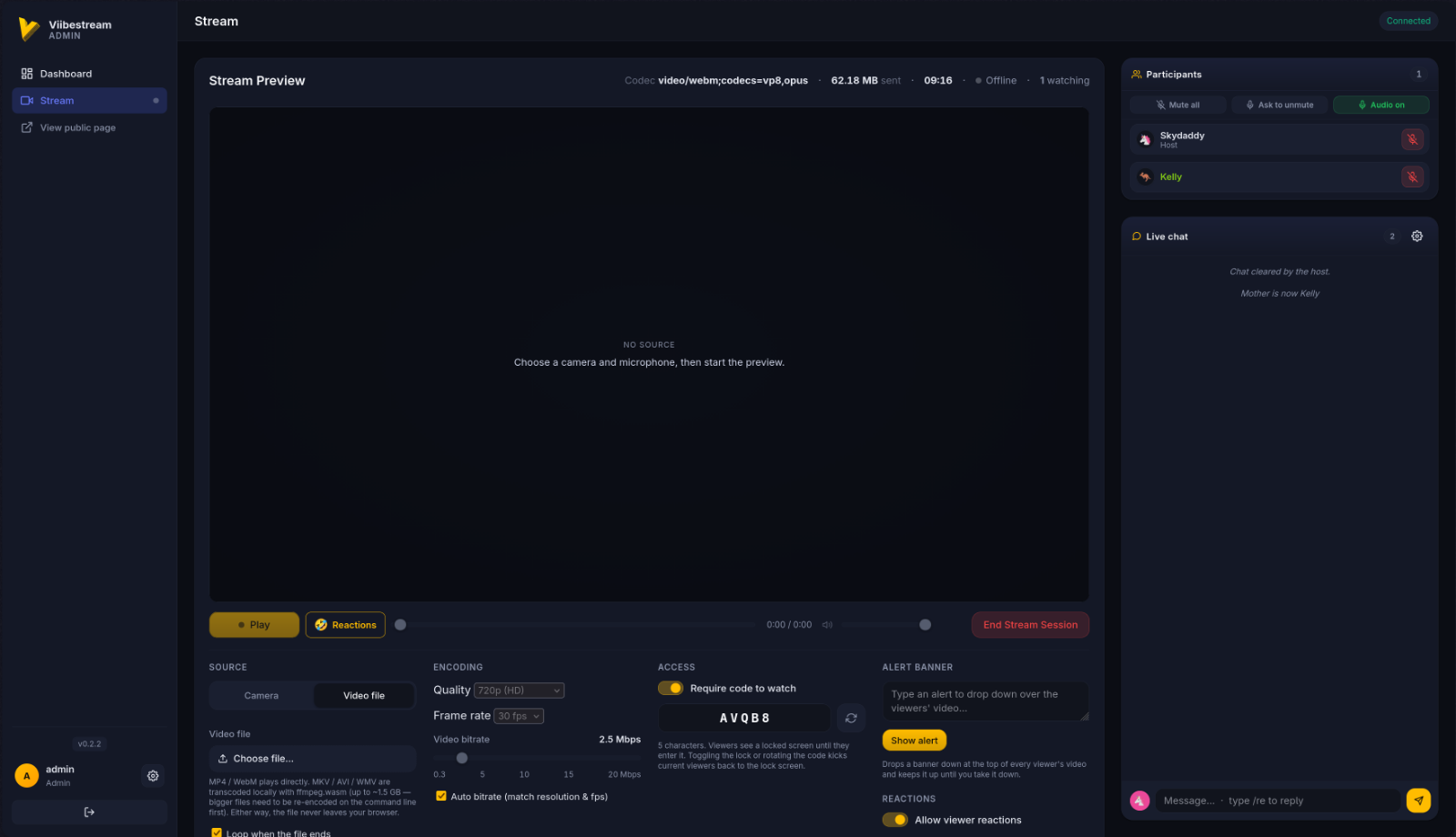
Viibestream is a self-hosted live streaming platform that runs entirely in the browser. Broadcast from your camera and mic — or share a video file — and viewers watch instantly over a WebSocket, with no plugins, native apps, or third-party services in the loop. You own the server, the stream, and the data.
Features
- Browser broadcasting from camera + mic, or share a video file straight from the browser
- Public viewer page with autoplay, mute/unmute, volume, fullscreen and a live viewer count
- Plays on Apple devices — the pipeline prefers fragmented MP4 (H.264/AAC), the one container every browser's MSE accepts, and falls back to WebM automatically; iPhones and iPads use ManagedMediaSource, and the broadcaster is warned when viewers can't play the current format
- Phone-first viewer — under 48rem the page becomes an app-like frame: a full-bleed video stage, controls riding on the video, and chat as a collapsible bottom sheet
- "Now Showing" panel — title, description, IMDB link and poster, updated live for viewers; sharing the public link unfurls with the film's title, description and poster
- Access lock and curtain — gate the stream behind a code, or close the curtain so nobody gets in at all; the curtain screen can show a "Show begins in H:MM:SS" countdown to a showtime you set, and the lock screen turns into a movie ticket when a Now Showing entry is set
- Real-time chat with custom names and emoji avatars, replies, @-mentions and emoji reactions
- Voice talk-back — viewers can be heard via voice-activity detection, with multi-speaker mixing
- Moderation — per-person mute, "mute all", renaming a disruptive viewer, a participant roster with speaking indicators, and IP bans
- Watch-party sync — the viewer sizes its own cushion behind live from the real chunk cadence, so everyone stays the same distance behind the broadcast
- Role-based access — admin / streamer / viewer, with a login-gated admin dashboard
- Hardened by default — bcrypt passwords, CSRF on every form, per-request CSP nonces, session hardening, login rate limiting and account lockout, optional Cloudflare Turnstile
Requirements
- Docker Engine 20.10+ and the Docker Compose v2 plugin
- A modern browser for broadcasting (camera/mic needs HTTPS or localhost)
Install with Docker Compose
Create docker-compose.yml using the published image:
services:
  viibestream:
    image: hyprlab/viibestream:latest
    container_name: viibestream
    restart: unless-stopped
    env_file:
      - .env
    environment:
      - FLASK_ENV=production
    ports:
      - "0.0.0.0:${PORT:-8080}:${INTERNAL_PORT:-8000}"
    volumes:
      - viibestream_data:/app/instance
    security_opt:
      - no-new-privileges:true
    tmpfs:
      - /tmp
    cap_drop:
      - ALL
    cap_add:
      - CHOWN
      - SETGID
      - SETUID

volumes:
  viibestream_data:
Grab the example env file and generate a secret key:
curl -fsSL https://raw.githubusercontent.com/hyprlab/viibestream/main/.env.example -o .env
python3 -c "import secrets; print(secrets.token_urlsafe(64))"
Set the essentials in .env, then launch:
SECRET_KEY=<paste-long-random-string>
INITIAL_ADMIN_USERNAME=admin
INITIAL_ADMIN_PASSWORD=<strong-one-time-password>
PUBLIC_ORIGIN=https://stream.example.com
docker compose pull
docker compose up -dOpen the public viewer at http://localhost:8080, sign in at /auth/login, change your password, then go live at /admin/stream. To build from source, clone the repo and run docker compose up --build -d.
Configuration
| Variable | Default | Purpose |
|---|---|---|
SECRET_KEY | _required_ | Signs session cookies and CSRF tokens |
INITIAL_ADMIN_PASSWORD | — | One-time bootstrap password; blank it after first sign-in |
PUBLIC_ORIGIN | http://localhost:8080 | Allowed browser origin(s) for Socket.IO |
BEHIND_HTTPS_PROXY | 0 | 1 behind a TLS-terminating reverse proxy (recommended) |
TLS_ENABLE | 0 | 1 serves self-signed HTTPS on :8443 for LAN/demo |
PORT / INTERNAL_PORT | 8080 / 8000 | Host port / container listen port |
Behind a reverse proxy, forward the WebSocket upgrade for /socket.io/* and send X-Forwarded-Proto: https.
Example .env
Copy this to .env next to your docker-compose.yml and adjust:
# Copy to .env and fill in. NEVER commit .env to git.
# Generate a strong key: python -c "import secrets; print(secrets.token_urlsafe(64))"
SECRET_KEY=change-me-generate-with-secrets-token_urlsafe-64
# Initial admin user, seeded only if no admin exists yet.
# Sign in once and change the password from the Settings modal.
INITIAL_ADMIN_USERNAME=admin
INITIAL_ADMIN_EMAIL=<your-email>
INITIAL_ADMIN_PASSWORD=change-me-on-first-login
# ── HTTPS strategy ─────────────────────────────────────────────────────
# Browsers refuse to expose navigator.mediaDevices.getUserMedia (camera
# and microphone) on any non-localhost HTTP origin. Pick ONE of the
# strategies below so broadcasters can capture media.
#
# Strategy A — Reverse proxy in front (recommended for real domains):
# You run Caddy / nginx / Cloudflare / etc. with a real cert. The
# proxy forwards to this container on plain HTTP. Set:
# BEHIND_HTTPS_PROXY=1
# TLS_ENABLE=0
# The proxy MUST forward:
# - WebSocket upgrade headers (Connection, Upgrade)
# - X-Forwarded-Proto: https
# - X-Forwarded-For: $remote_addr
# - Host: $host
#
# Strategy B — In-container self-signed TLS (LAN / quick demos):
# The container generates a self-signed cert at first boot and serves
# HTTPS itself on :8443. Browsers will warn once per device. Set:
# BEHIND_HTTPS_PROXY=0
# TLS_ENABLE=1
# TLS_HOSTS=localhost,127.0.0.1,10.0.1.14 # SANs on the cert
# PORT=8443
#
# Strategy C — HTTP only on localhost (single-machine dev):
# BEHIND_HTTPS_PROXY=0
# TLS_ENABLE=0
BEHIND_HTTPS_PROXY=0
TLS_ENABLE=0
TLS_HOSTS=localhost,127.0.0.1
# Every origin from which a browser might load the page, comma-separated.
# Socket.IO's CORS check rejects WebSocket handshakes whose Origin is
# not in this list. For a public domain, include the https:// version.
PUBLIC_ORIGIN=http://localhost:8080
# Host port → container. The container listens on :8000 (plain) or
# :8443 (TLS_ENABLE=1) internally; this is the port you'll publish.
PORT=8080
# SQLite path inside the container (instance volume).
DATABASE_URL=sqlite:////app/instance/viibestream.db
# ── Cloudflare Turnstile (optional login captcha) ──────────────────────
# Optional: these only SEED the initial config on first boot. After that,
# manage Turnstile from the admin UI: Settings → Security. Leave both blank
# to start disabled and configure it entirely from the interface.
TURNSTILE_SITE_KEY=
TURNSTILE_SECRET_KEY=Updating
docker compose pull
docker compose up -dThe SQLite database lives in the viibestream_data volume and survives restarts and rebuilds (only docker compose down -v deletes it).
AI notice
Viibestream is built by a human maintainer working with generative AI as a development tool:
- Code — the large majority of the code in the repository was written with Anthropic's Claude (via Claude Code), working from the maintainer's direction. The maintainer decides what gets built, reviews the results, tests every release, and signs off on everything that ships.
- Text — documentation, release notes, and in-app copy are largely AI-drafted and human-edited.
- The app itself contains no AI. Viibestream has no AI features and makes no requests to AI services — AI was used to build it, not to run it.
Bug reports and pull requests are welcome from humans and their AI tools alike; everything merged gets the same human review.
Tech stack & license
Flask 3 · Flask-SocketIO · SQLAlchemy/SQLite · vanilla JS (MediaRecorder / MediaSource, with ManagedMediaSource on iOS) · Gunicorn · Docker. Broadcasts are fragmented MP4 where the browser can record it, WebM otherwise. Free and open source under the GNU AGPL-3.0. Full docs and releases on GitHub.


