


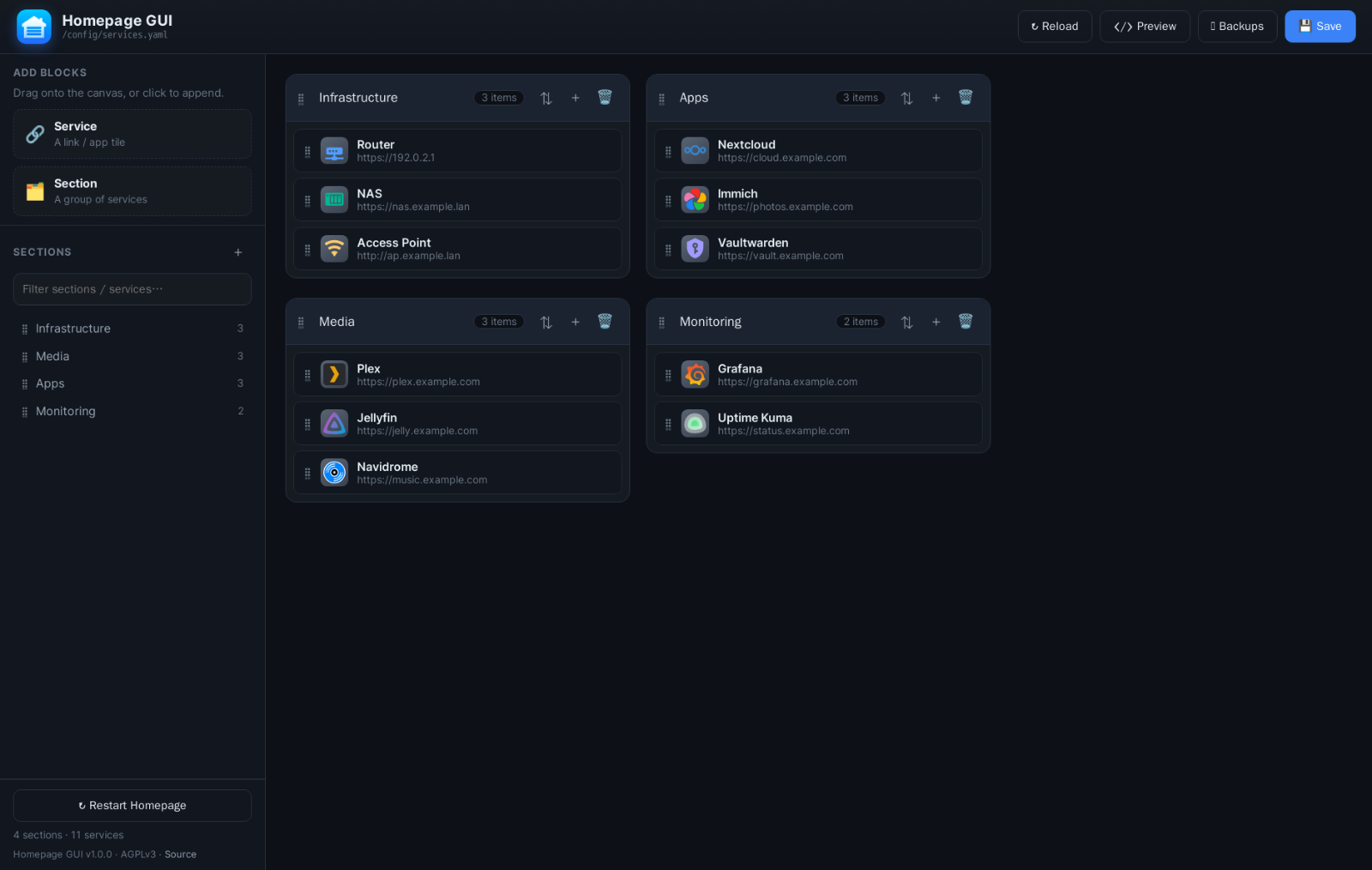
Homepage GUI is a self-hosted, drag-and-drop web editor for gethomepage's services.yaml. Instead of hand-editing YAML, you arrange your dashboard by dragging sections and services around in the browser — with automatic backups, a YAML preview, and one-click live reload to your running Homepage instance. It runs in one container, behind a sign-in you set up on first boot, and a setup wizard finds your services.yaml for you.
Features
- Drag & drop reordering of sections, services within a section, and services across sections
- Sidebar section navigator with a live filter, plus draggable "Service" / "Section" blocks you can drop onto the canvas or click to append
- Full service editing — name, icon, URL, description, ping, and an Advanced (YAML) panel that round-trips widgets,
server/containerand any other keys without losing them - Icon chooser across Dashboard Icons, Material Design Icons, Font Awesome, 200k+ Iconify icons, and your own PNG/SVG uploads, with per-icon color overrides
- Safe saves — atomic writes, validation, and automatic timestamped backups with a restore UI (14-day auto-purge, count cap)
- YAML preview before you commit, plus alphabetical sort per section
- One-click Homepage restart so new icons load immediately
- Sign-in, set up on first boot — a short wizard creates your admin account, then the whole app (UI and API) sits behind a login, with optional Cloudflare Turnstile
- Finds your config by itself — the wizard scans every folder mounted into the container and asks Docker which container is Homepage, so you pick your file from a list instead of typing a path
- Cached icon previews — icon bodies and searches are proxied and cached on disk, so the picker costs a handful of requests instead of hundreds
- About dialog (click the version in the sidebar footer) — links to the project site, the source, and Homepage itself, plus the full release notes
- Self-hosted Inter font; core editing and saving work fully offline
Requirements
- A host running Docker and Docker Compose v2 (
docker compose …) - An existing Homepage install whose
configdirectory (containingservices.yaml) is on the same host — you don't need to know where it is, the setup wizard works that out - A browser with internet access for icon search/preview (the Iconify and jsDelivr CDNs, the same ones Homepage uses). Editing and saving work fully offline.
Install with Docker Compose
Grab the files:
git clone https://github.com/hyprlab/homepage-gui.git
cd homepage-guicompose.yaml:
services:
  homepage-gui:
    image: hyprlab/homepage-gui:latest
    container_name: homepage-gui
    restart: unless-stopped
    # Run as root so it can write the (often root-owned) services.yaml.
    user: "0:0"
    environment:
      - HOMEPAGE_CONFIG_DIR=/config
      # Backups sit next to whichever services.yaml is in use.
      # Uncomment to pin them to one folder instead.
      # - BACKUP_DIR=/config/.homepage-gui-backups
      - KEEP_BACKUPS=40
      - KEEP_BACKUP_DAYS=14
      # Custom icon uploads (also mounted into Homepage at /app/public/icons).
      - ICONS_DIR=/icons
      # Detected automatically during setup if you leave it alone.
      - HOMEPAGE_CONTAINER=${HOMEPAGE_CONTAINER:-homepage}
      # Session signing key. If unset, one is generated and kept in DATA_DIR.
      - SECRET_KEY=${SECRET_KEY:-}
      # Cloudflare Turnstile (optional — leave empty to disable the challenge).
      - TURNSTILE_SITE_KEY=${TURNSTILE_SITE_KEY:-}
      - TURNSTILE_SECRET_KEY=${TURNSTILE_SECRET_KEY:-}
      # Admin account database + session key. Defaults to a dot-folder in the
      # mounted config dir, so it survives recreates with no extra volume.
      - DATA_DIR=${DATA_DIR:-/config/.homepage-gui}
      # Icon previews are proxied and cached on disk rather than fetched
      # per-icon from api.iconify.design, which rate-limits by IP.
      - ICON_CACHE_DIR=${ICON_CACHE_DIR:-}
      - ICON_CACHE_MAX=${ICON_CACHE_MAX:-20000}
    ports:
      - "${HOST_PORT:-5005}:5000"
    volumes:
      # Any folder at or above your Homepage config directory — the wizard
      # searches every mount for services.yaml.
      - ${HOST_CONFIG_DIR:-./config}:/config
      - ${HOST_ICONS_DIR:-./icons}:/icons
      # Lets the GUI find your Homepage container (and its config directory on
      # the host) during setup, and restart it to pick up newly-uploaded icons.
      - /var/run/docker.sock:/var/run/docker.sock
Then copy the example .env and point it at your host paths:
cp .env.example .envOnly HOST_CONFIG_DIR really has to be right, and even that is forgiving — the setup wizard searches everything you mount, so a parent of your config directory works just as well as the directory itself. HOMEPAGE_CONTAINER is detected from the Docker socket during setup, so leave it alone unless you run without the socket.
Don't know your config path? Start it anyway and let the app tell you. With the Docker socket mounted, the wizard asks Docker where your Homepage container keeps its config and prints the exact host path, along with the compose line to add. Put that path in HOST_CONFIG_DIR, run docker compose up -d again, and press Scan again in the wizard.
Custom icon uploads (optional)
Homepage serves local icons from /app/public/icons (referenced as /icons/<file>). For uploads to appear in Homepage, the same host folder must be mounted into both containers. Add this volume to your Homepage compose.yaml:
services:
  homepage:
    volumes:
      - /path/to/homepage/config:/app/config
      - /path/to/homepage/icons:/app/public/icons   # <-- add this (matches HOST_ICONS_DIR)
      - /var/run/docker.sock:/var/run/docker.sock
Then recreate Homepage once with docker compose up -d in your Homepage directory.
Start it
docker compose up -dOpen http://<host>:5005 (the port from HOST_PORT) on any device on your LAN. The first visit runs a short setup wizard:
- Welcome — a reminder that this edits an existing Homepage install.
- Create the admin account — name (optional), username, password (8+ characters). This is the only account.
- Connect to Homepage — while you were filling in the form, the app searched every folder you mounted and asked Docker about your Homepage container. It lists what it found, each candidate with the reason it turned up, its path on the host, and whether this container can write to it, with the most likely one already selected. Confirm it, pick another, or type a path yourself.
- You're all set — confirms the file it will write to and that it's writable, so a bad mount shows up here rather than on your first save.
The repo's own compose.yaml also carries a build: . line, so docker compose up -d --build builds the image locally instead of pulling it.
Finding your services.yaml
The wizard's Connect to Homepage step answers "which file am I editing?" for you, so a new install doesn't hinge on getting a path right in .env first. It looks in two places:
- Every folder mounted into the container. Each one is walked for a
services.yaml, and a match ranks higher when Homepage's other config files (settings.yaml,widgets.yaml,bookmarks.yaml, …) sit beside it. Mount your config directory anywhere you like — the scan finds it. - Docker, if its socket is mounted. The Engine API says which container is Homepage and which host directory it has bound to
/app/config. Cross-referenced with the host directories bound into this container, that pins down the file exactly — and names your Homepage container for the Restart Homepage button at the same time.
Your choice is saved in DATA_DIR/settings.json and takes precedence over SERVICES_PATH / HOMEPAGE_CONFIG_DIR, so it survives container recreates without an .env edit. To change it later — or if the file moves — click the path under the Homepage GUI title in the header to reopen the same picker. Backups follow the file: unless you set BACKUP_DIR explicitly, they're written to .homepage-gui-backups next to whichever services.yaml is in use.
The scan only sees what's mounted into the container; it can't read the rest of your host. That's the point of the Docker lookup — it can name a path the container can't open, so you know what to mount.
The login
Homepage GUI edits the file your dashboard runs on, so it ships with a sign-in. There's one account and no registration page — this is a single-operator tool. Keep the password in your password manager; there's no reset link. Every page and every /api/* route needs a session, and a Sign out button sits in the top bar.
The account database and the session signing key live in DATA_DIR, which defaults to .homepage-gui/ inside the config directory you already mount — so they survive docker compose up -d and container recreates with no extra volume.
- The session cookie is
HttpOnlyandSameSite=Lax, signed withSECRET_KEY(generated and persisted inDATA_DIRwhen unset, so sign-ins survive restarts). - Keep me signed in issues a long-lived remember cookie; leave it unticked and the session ends with the browser.
- Writes (
POST/PUT/PATCH/DELETE) carry a per-session CSRF token, as a hidden_csrffield in forms or anX-CSRFheader from the editor's own API calls. /api/healthstays reachable without a session for container health checks, but reports nothing beyond{"ok": true}until you sign in.- If you expose the GUI beyond your LAN, put it behind HTTPS — over plain HTTP the session cookie travels in the clear.
Cloudflare Turnstile (optional)
If the GUI is reachable from the internet, you can put a Turnstile challenge on the login. Create a widget at Cloudflare dashboard → Turnstile, then put the pair in .env:
TURNSTILE_SITE_KEY=0x4AAAAAAA...
TURNSTILE_SECRET_KEY=0x4AAAAAAA...
The challenge renders on the sign-in page and is verified server-side against Cloudflare before the password is ever checked. Leave either value empty and the challenge is skipped entirely — no Cloudflare account needed for LAN use. If Cloudflare can't be reached, the login fails closed rather than waving people through.
Forgot the password
There's no reset link, but the account row is yours to delete — remove the database and the next start runs the setup wizard again:
docker compose down
sudo rm /path/to/homepage/config/.homepage-gui/homepage-gui.db
docker compose up -d
Your services.yaml, backups and uploaded icons are untouched by this.
Using the app
- Add a section — the
+in the sidebar, or drag the "Section" block onto the canvas. - Add a service — a section's
+, or drag the "Service" block into a section. - Edit — click ✎ on a card (or double-click it) to open the editor; set fields and pick an icon. Use Advanced (YAML) for widgets and other keys.
- Reorder / move — drag the ⠿ handles; drag services across sections.
- Sort a section — the ⇅ button (toggles A→Z / Z→A).
- Preview — see the exact YAML before saving.
- Save —
Ctrl/Cmd+Sor the Save button. A backup is taken automatically. - Backups — open the Backups dialog to restore a previous version.
- Change the file — click the path under the title in the header to reopen the connection picker.
- About — click the version in the sidebar footer for links and the full release notes.
In the icon chooser, the My Uploads tab takes PNG/SVG icons by button or drag-and-drop. They land in the shared icons folder and are referenced as /icons/<file>. Because Homepage only reads public/icons at startup, new uploads require a Homepage restart — use the Restart Homepage button in the sidebar. Workflow: upload → select the icon for a service → Save → Restart Homepage.
Every save and restore first writes a timestamped copy to a .homepage-gui-backups/ dot-folder beside your services.yaml (Homepage ignores dot-folders). Backups older than KEEP_BACKUP_DAYS (default 14) are purged automatically, with KEEP_BACKUPS (default 40) as a hard cap.
Configuration
Container environment variables, set in compose.yaml's environment::
| Variable | Default | Purpose |
|---|---|---|
HOMEPAGE_CONFIG_DIR |
/config |
Directory (inside the container) holding services.yaml |
SERVICES_PATH |
$HOMEPAGE_CONFIG_DIR/services.yaml |
Starting point for the file path — a file chosen in the app wins over it |
BACKUP_DIR |
(beside services.yaml) |
Where backups are written; set it to pin them to one folder |
KEEP_BACKUPS |
40 |
Hard cap on backup count (0 = unlimited) |
KEEP_BACKUP_DAYS |
14 |
Auto-purge backups older than N days (0 = keep forever) |
ICONS_DIR |
/icons |
Where uploaded icons are stored (shared with Homepage) |
HOMEPAGE_CONTAINER |
homepage |
Container the GUI restarts to load new icons (also detectable in-app) |
DOCKER_SOCK |
/var/run/docker.sock |
Docker socket used for the restart |
SOURCE_URL |
this repo | Source link shown in-app (set to your fork if modified) |
PORT |
5000 |
In-container listen port (host port is mapped in compose) |
DATA_DIR |
$HOMEPAGE_CONFIG_DIR/.homepage-gui |
Holds the account database, session key and settings.json |
SECRET_KEY |
auto | Session signing key; generated and persisted in DATA_DIR if unset |
TURNSTILE_SITE_KEY |
(empty) | Cloudflare Turnstile site key — empty disables the challenge |
TURNSTILE_SECRET_KEY |
(empty) | Turnstile secret key (both must be set to enable it) |
DATABASE_URL |
sqlite:///$DATA_DIR/homepage-gui.db |
Override the account database location |
ICON_CACHE_DIR |
$DATA_DIR/icon-cache |
Disk cache for Iconify icon bodies, search results and the dashboard-icons index |
ICON_CACHE_MAX |
20000 |
Cached icon bodies to keep before pruning the oldest (~400 bytes each) |
Host-side variables, read from .env by compose:
| Variable | Example | Purpose |
|---|---|---|
HOST_CONFIG_DIR |
/srv/homepage/config |
Host path mounted to /config (the wizard can tell you this one) |
HOST_ICONS_DIR |
/srv/homepage/icons |
Host path mounted to /icons |
HOST_PORT |
5005 |
Host port mapped to the container's 5000 |
HOMEPAGE_CONTAINER |
homepage |
Passed through for the restart feature |
IMAGE |
hyprlab/homepage-gui:0.4.1 |
Pin a specific image tag (optional) |
SECRET_KEY |
a1b2c3… |
Pin the session signing key (optional) |
The container runs as root (user: "0:0") so it can write a typically root-owned services.yaml. Change user: if your config files are owned by a different UID/GID.
Example .env
Copy this to .env next to your docker-compose.yml and adjust:
# Copy to .env and adjust for your host, then `docker compose up -d`.

# Host path to your Homepage config directory (the folder containing services.yaml).
# Not sure where that is? Start the container anyway: with the Docker socket mounted,
# the setup wizard asks Docker where your Homepage container keeps its config and shows
# you the exact host path to paste here.
HOST_CONFIG_DIR=/path/to/homepage/config

# Host path to a folder shared with Homepage's /app/public/icons, used for custom
# icon uploads. Add the matching mount to your Homepage compose:
#   - /path/to/homepage/icons:/app/public/icons
HOST_ICONS_DIR=/path/to/homepage/icons

# Port to expose the GUI on (browse to http://<host>:<HOST_PORT>).
HOST_PORT=5005

# Name of your Homepage container, so the GUI's "Restart Homepage" button can
# restart it (via the mounted Docker socket) to pick up newly-uploaded icons.
HOMEPAGE_CONTAINER=homepage

# --- Login and first-run setup ---------------------------------------------
# The GUI requires a sign-in. On first start it walks you through a setup wizard
# that creates the admin account, then finds your services.yaml and asks you to
# confirm it — nothing to configure here. That choice is saved in DATA_DIR and
# overrides SERVICES_PATH, so you can also re-point the editor from the browser
# (click the path in the header) instead of editing this file.

# Session signing key. If unset, one is generated and kept in the data dir
# (so sign-ins survive restarts).
SECRET_KEY=

# Cloudflare Turnstile (optional — leave empty to disable the challenge).
# Get a site/secret pair at https://dash.cloudflare.com → Turnstile.
TURNSTILE_SITE_KEY=
TURNSTILE_SECRET_KEY=

# Where the account database and session key live. Defaults to a dot-folder
# inside your mounted config dir, so it persists with no extra volume.
DATA_DIR=

# --- Icon cache ------------------------------------------------------------
# Icon previews are proxied through the GUI and cached on disk, so the picker
# never fans out hundreds of requests to api.iconify.design (which rate-limits
# by IP). Defaults to a folder inside DATA_DIR; ~400 bytes per icon.
ICON_CACHE_DIR=
ICON_CACHE_MAX=20000
Updating
cd homepage-gui
docker compose pull
docker compose up -d
Pin a specific version with IMAGE=hyprlab/homepage-gui:0.4.1 in .env.
Existing installs keep working exactly as configured — the wizard only runs when there's no account yet, so you won't be asked about paths again. The file picker is still there when you want it: click the path in the header.
AI notice
Homepage GUI is built by a human maintainer working with generative AI as a development tool:
- Code — the large majority of the code in the repository was written with Anthropic's Claude (via Claude Code), working from the maintainer's direction. The maintainer decides what gets built, reviews the results, tests every release, and signs off on everything that ships.
- Text — documentation, release notes, and in-app copy are largely AI-drafted and human-edited.
- The app itself contains no AI. Homepage GUI has no AI features and makes no requests to AI services — AI was used to build it, not to run it.
Bug reports and pull requests are welcome from humans and their AI tools alike; everything merged gets the same human review.
Tech stack & license
Flask · Flask-Login · SQLAlchemy · PyYAML · gunicorn on the backend; vanilla JavaScript · SortableJS · js-yaml on the front, with bundled Inter (SIL OFL) — no build step, and the only database is a single-table SQLite file holding the admin account. Free and open source under the GNU AGPL-3.0; because Homepage GUI is network-served software, AGPL §13 requires that users of a modified version can obtain its source, which is what the in-app Source link and SOURCE_URL are for. Full docs and releases on GitHub.


