
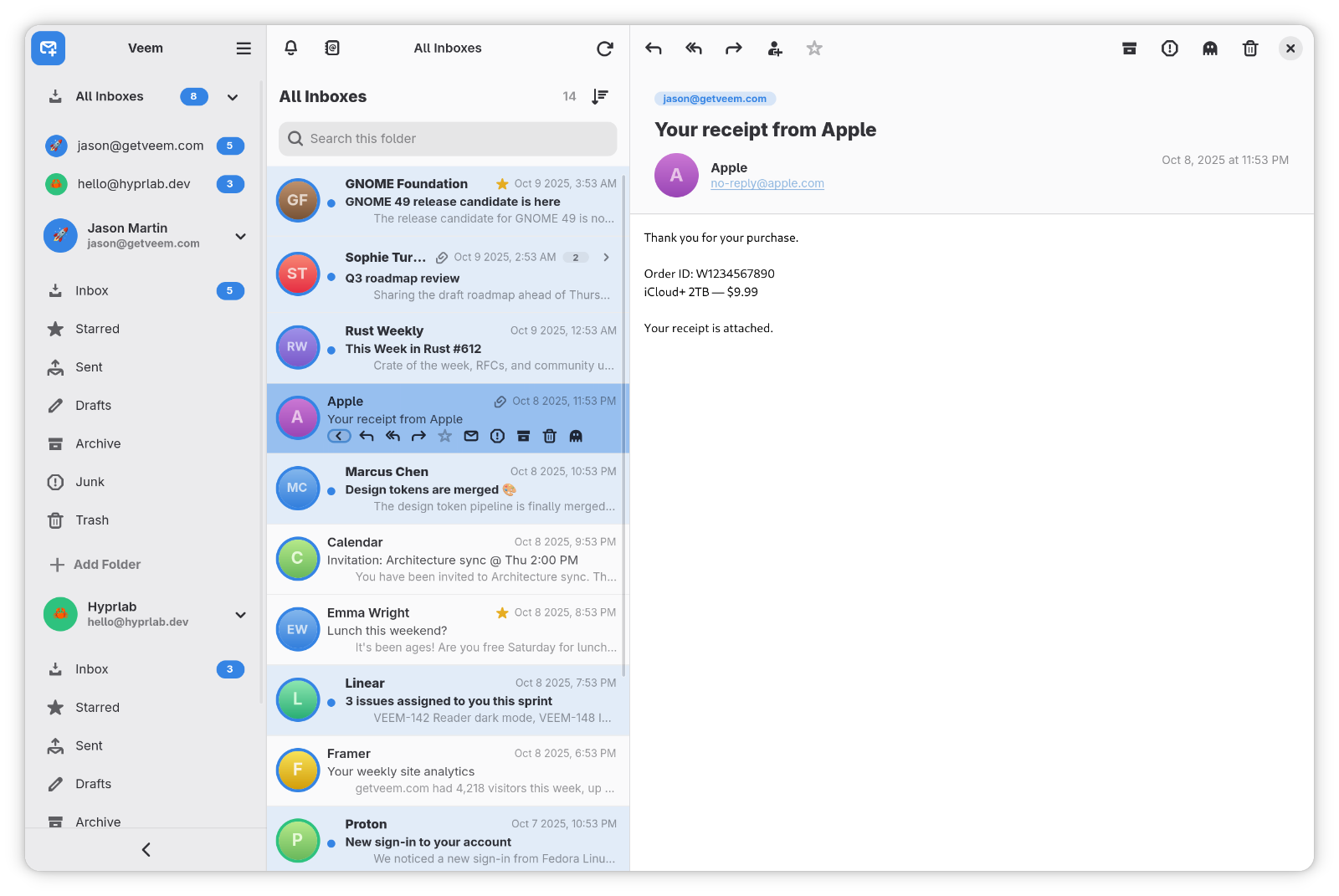
Veem is a clean, fast, GNOME-native email client with a calm three-pane layout, a unified inbox, and first-class OAuth support. It's built in Rust with GTK 4 and libadwaita, so it looks and feels like a first-party GNOME app — fast to open, effortless to read, and private by default. Your mail and credentials stay on your machine: no accounts, no telemetry, no cloud middleman.
Features
- Multiple accounts over IMAP and POP3, with a unified inbox across all of them
- OAuth 2.0 sign-in for Google and Microsoft 365, plus GNOME Online Accounts integration and classic password auth
- Real-time updates with IMAP IDLE push, background indexing, and two-way sync with automatic reconciliation
- Conversation threading, HTML signatures, drafts, and folder management
- Full-text search across your mailboxes with infinite scroll
- Contacts integration with GNOME Contacts and recipient autocomplete
- Personal touches — per-account accent colors and emoji avatars, optional Gravatar avatars
- Native GNOME feel — adaptive three-pane layout, Wayland-first, light/dark to match your system theme
Privacy & security
- No telemetry, no analytics — nothing phones home
- Remote content blocked by default to defeat tracking pixels, with per-sender allow/block lists
- Credentials live in the system keyring, never in plaintext
Tech stack
Rust · GTK 4 · libadwaita · WebKitGTK 6. Credentials are stored in the system keyring.
Install
Flatpak
Veem is available on getveem.com as a Flatpak for easy installation
Build from source
Install the GTK 4, libadwaita and WebKitGTK development libraries for your distribution first:
# Fedora
sudo dnf install gtk4-devel libadwaita-devel webkitgtk6.0-devel

# Debian / Ubuntu
sudo apt install libgtk-4-dev libadwaita-1-dev libwebkitgtk-6.0-dev
Then build and install:
git clone https://github.com/hyprlab/veem.git
cd veem
cargo build --release
./install.sh
The install script places the binary, icon and .desktop file under ~/.local.
OAuth setup
Accounts are added from Settings → Accounts. Plain IMAP/SMTP needs only your server details and an app password. Microsoft OAuth works out of the box. Google requires GNOME Online Accounts, or a custom OAuth client in ~/.config/veem/oauth.toml:
[google]
client_id = "your-client-id.apps.googleusercontent.com"
client_secret = "your-client-secret"

[microsoft]
client_id = "your-azure-application-client-id"
The VEEM_GOOGLE_CLIENT_ID, VEEM_GOOGLE_CLIENT_SECRET and VEEM_MICROSOFT_CLIENT_ID environment variables are supported too.
License
Free and open source under the GNU AGPL-3.0-or-later. Website: getveem.com · Source and releases on GitHub.